



Using the Grid in Ableton Live

With
Isaac CotecIsaac Cotec covers the editing grid in Ableton Live - how snapping works and how to switch between adaptive and fixed grids to keep your parts in time.
What's in the course
17 lessons (1h 33m) · 1 free
Lesson transcript
Working in the MIDI Editor
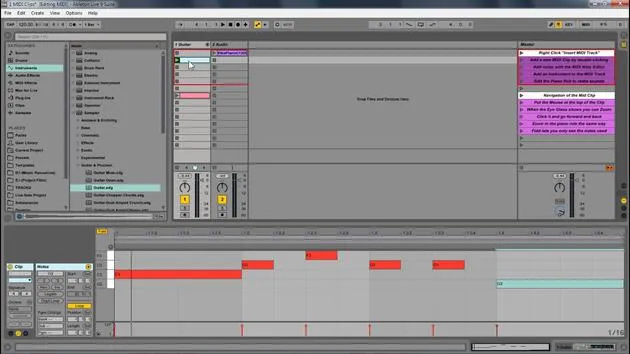
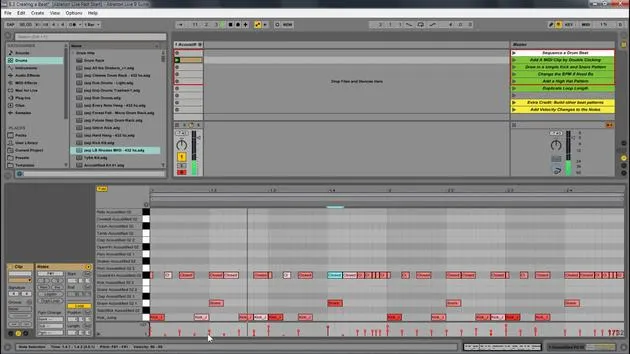
Now, when working in the MIDI editor, you will notice that things snap into place. This is because, by default, Ableton Live snaps everything to a grid to ensure that they are in time.
Grid Options
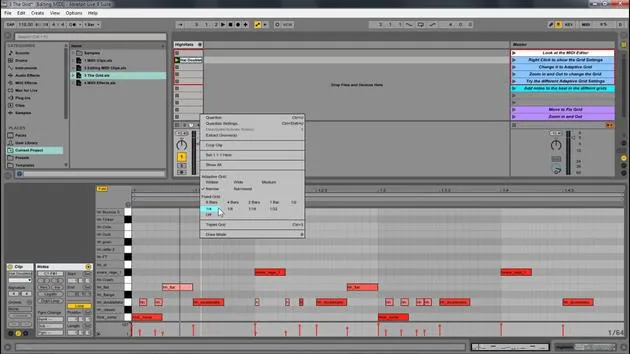
If you have your mouse on a grid and right-click, you will see your grid options. So let's open up this new set and look at that.
- Hats: We have these hats.
- Adding Elements: If I wanted to add some new elements, I just double-click and then add them. But right now, you'll notice it's to a grid, right?
If I right-click, I have all my different grid options here.
Adaptive Grid
- Right now, it's set to adaptive grid.
- This means if I zoom in, you'll notice that it's getting more and more fine.
- All the little grid points are getting finer than if I zoom out.
- If I double-click in here, it's going to create a much bigger size.
It's adaptive in the way that the more you zoom in, the more fine your detail control is, or the more you zoom out, the bigger the notes.
Other Grid Options
We have all these different grid settings:
- Widest: You'll still see that it's creating new grid points; they're just very big grid points.
- Narrowest: These grid points are very small, no matter where we are zoomed in.
- Personal Preference: I personally like narrow or medium.
Then we also have fixed grids.
- Fixed Grid: This means that no matter where we're zoomed in, it will stay at that specific amount.
- For example, if I set it to eighth notes, zooming in and out will always show eighth notes.
- If I set it to thirty-second notes, it will always show thirty-second notes.
Understanding Triplets
Another important feature is the triplet setting.
- If I hit triplet, it will show us all the beats within a triplet.
- For this, you'll need to know a little bit about triplets and rhythm.
The basic concept is that we're not putting things in a faulty sense.
Let's go back to not using triplets. You'll notice that these notes are slightly off that same size grid, but now we're not looking at triplets. This way, you can create more interesting rhythms.
Quick Tip
A quick trick is that if I click and create one, if I hold Alt, you'll notice there is no grid.
- It's a great way to move something off the grid if you want to.
- You can always right-click and then set it to off, which will also have no grid.
So, wherever I click, it will create something. However, it can be hard to keep the timing this way.
Personally, I like adaptive narrow; it seems to work really well for me.
17 lessons
1h 33m of structured video lessons
Advanced video features
Slow down, loop a passage, follow along
Mobile, tablet & desktop
Practise wherever you are
100% satisfaction guarantee
30-day money-back guarantee
Meet your guru
Meet your guru
Isaac Cotec is, arguably, one of the best Ableton trainers in the world! While working on his own music, he began teaching recording techniques, sound design, and Ableton Live to private students, and since earning his certification as an official Ableton Certified Trainer he has helped thousands of producers step up their game and succeed as musicians.
Isaac started producing electronic music in 2005 with Psyche Sonics, an experimental group working with the science and research of binaural beats and altering consciousness through sound. After touring, he continued writing music under the alias Cotec and later emerged as the artist Subaqueous, blending his electronic past with both future and organic production techniques. To date, he has released 3 albums and 4 EPs.
Isaac is also the founder and manager of the record label Invibe Music, which represents some of the Pacific Northwest's best electronic music and specialises in midtempo dance music.
In his Ableton Live courses, Isaac shares the production, sound design and songwriting techniques he has spent years refining - the very skills he uses to turn a spark of an idea into a finished track.







