



Recording MIDI in Ableton Live

With
Isaac CotecIsaac Cotec walks through recording MIDI in Ableton's Session View, covering the key settings: global quantization, record arm and the clip record button.
What's in the course
17 lessons (1h 33m) · 1 free
Lesson transcript
Recording MIDI in Session View
Now let's look at recording within MIDI. Recording MIDI in Session View is very similar to audio, but there are a few key settings that you need to know to be able to record.
Key Settings
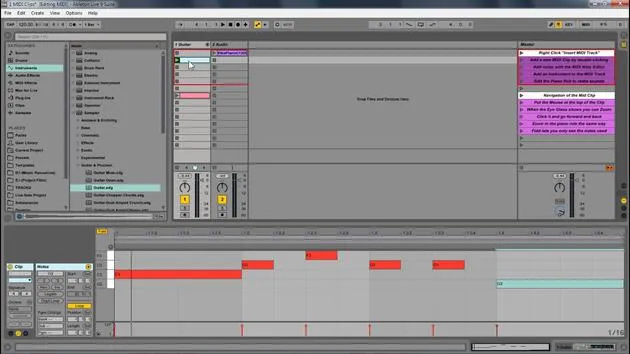
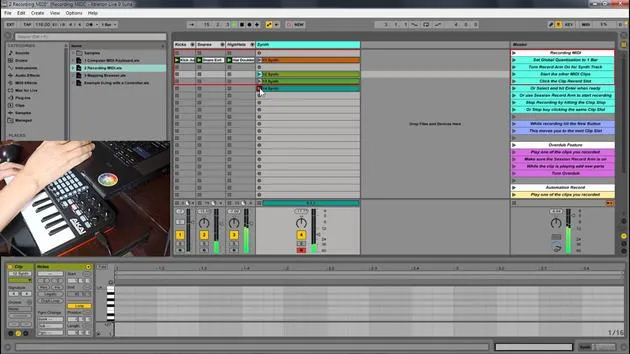
The following image represents those settings:
- Global Quantization
- Record Arm Button
- Session Arm Button
- Clips Record Button
- Clip Stop Button
- New Button (This creates a new scene)
Global Quantization
First, let's look at the global quantization.
- If I set this to, let's say, four bars, it will wait until the end of four bars before starting to record.
- For example, if I start recording on the second bar, it will wait until it completes four bars before starting the recording.
Example:
Now I'm hitting it; notice it's blinking, waiting. It should start now.
Record Arm
The next thing we're going to look at is the Record Arm, which is crucial.
- Important Note: If I don't have this on, and I'm playing my keyboard, you won't hear anything.
- Once I hit Record Arm, we can hear the sound.
It's essential to have Record Arm set, even if you have the computer MIDI key button activated. You still need to arm it for it to pay attention to the incoming signal.
Now that I have that set and I'm aware of my global quantization, I'm going to set this to a bar. That's my preference.
Clips Record Button
The next important setting is the Record Button.
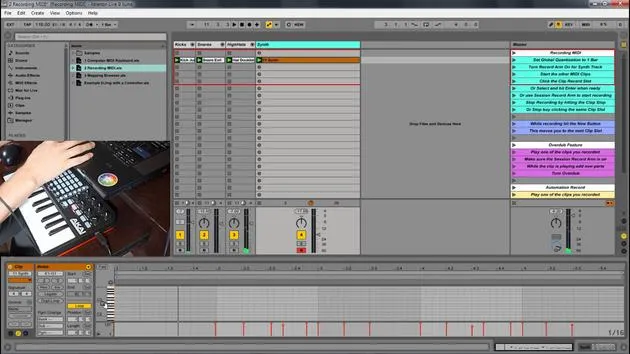
- If I press this and then hit Play, you will see that it recorded all the different MIDI notes.
Session Record Button
Now, let's discuss the Session Record Button.
- If I play this and just hit a note, you'll see that I can play on top of this without it recording.
- However, when I hit the Session Record Button, it starts recording whatever I'm doing into the clip.
If this button is off, you can play on top of it, but it won't actually record what's happening. This is similar to MIDI overdub.
Stopping the Recording
When recording, I have two options to stop it:
- I can hit Play, which stops it and plays it back.
- I can hit the Clip Stop Button, which will stop recording.
Alternate Option:
You can always click on another empty slot to start recording; it will stop whatever was before and just go to the next one. You can continue this process with variations all the way down.
New Button
Another new button in Ableton Live 9 is the New Button.
- When I hit New, it snaps me to a new spot.
- If I'm up here playing something and hit New, it jumps me down to another slot.
Summary
As a review, we have:
- Global Quantization: The point at which it starts recording the incoming signal.
- Record Arm Button: Ensures that it's listening to notes played on either my keyboard or computer keyboard.
- Session Record Arm Button: Allows for overdubbing; it won't record if this is off.
- Clip Stop Button: A way to stop recording or playback.
- New Button: Creates a new scene and puts you down to a new slot for recording.
Make sure to familiarize yourself with these settings to optimize your MIDI recording experience!
17 lessons
1h 33m of structured video lessons
Advanced video features
Slow down, loop a passage, follow along
Mobile, tablet & desktop
Practise wherever you are
100% satisfaction guarantee
30-day money-back guarantee
Meet your guru
Meet your guru
Isaac Cotec is, arguably, one of the best Ableton trainers in the world! While working on his own music, he began teaching recording techniques, sound design, and Ableton Live to private students, and since earning his certification as an official Ableton Certified Trainer he has helped thousands of producers step up their game and succeed as musicians.
Isaac started producing electronic music in 2005 with Psyche Sonics, an experimental group working with the science and research of binaural beats and altering consciousness through sound. After touring, he continued writing music under the alias Cotec and later emerged as the artist Subaqueous, blending his electronic past with both future and organic production techniques. To date, he has released 3 albums and 4 EPs.
Isaac is also the founder and manager of the record label Invibe Music, which represents some of the Pacific Northwest's best electronic music and specialises in midtempo dance music.
In his Ableton Live courses, Isaac shares the production, sound design and songwriting techniques he has spent years refining - the very skills he uses to turn a spark of an idea into a finished track.







