



Utiliser la grille dans Ableton Live

Avec
Isaac CotecIsaac Cotec passe en revue la grille d'édition dans Ableton Live : comment fonctionne le magnétisme et comment basculer entre grilles adaptatives et fixes pour garder tes parties en place.
Le contenu du cours
17 leçons (1h 33min) · 1 gratuites
Transcription de la leçon
Working in the MIDI Editor
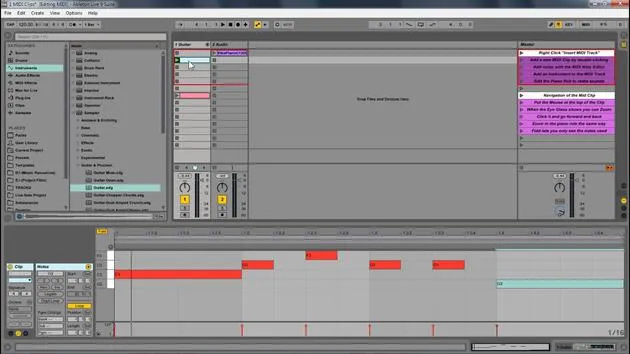
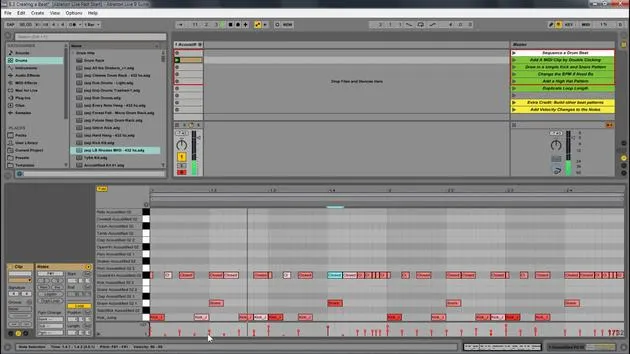
Now, when working in the MIDI editor, you will notice that things snap into place. This is because, by default, Ableton Live snaps everything to a grid to ensure that they are in time.
Grid Options
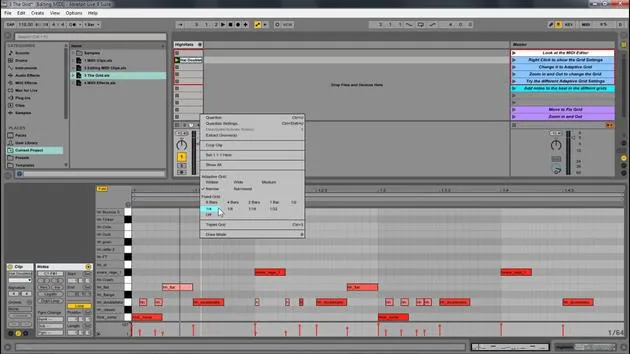
If you have your mouse on a grid and right-click, you will see your grid options. So let's open up this new set and look at that.
- Hats: We have these hats.
- Adding Elements: If I wanted to add some new elements, I just double-click and then add them. But right now, you'll notice it's to a grid, right?
If I right-click, I have all my different grid options here.
Adaptive Grid
- Right now, it's set to adaptive grid.
- This means if I zoom in, you'll notice that it's getting more and more fine.
- All the little grid points are getting finer than if I zoom out.
- If I double-click in here, it's going to create a much bigger size.
It's adaptive in the way that the more you zoom in, the more fine your detail control is, or the more you zoom out, the bigger the notes.
Other Grid Options
We have all these different grid settings:
- Widest: You'll still see that it's creating new grid points; they're just very big grid points.
- Narrowest: These grid points are very small, no matter where we are zoomed in.
- Personal Preference: I personally like narrow or medium.
Then we also have fixed grids.
- Fixed Grid: This means that no matter where we're zoomed in, it will stay at that specific amount.
- For example, if I set it to eighth notes, zooming in and out will always show eighth notes.
- If I set it to thirty-second notes, it will always show thirty-second notes.
Understanding Triplets
Another important feature is the triplet setting.
- If I hit triplet, it will show us all the beats within a triplet.
- For this, you'll need to know a little bit about triplets and rhythm.
The basic concept is that we're not putting things in a faulty sense.
Let's go back to not using triplets. You'll notice that these notes are slightly off that same size grid, but now we're not looking at triplets. This way, you can create more interesting rhythms.
Quick Tip
A quick trick is that if I click and create one, if I hold Alt, you'll notice there is no grid.
- It's a great way to move something off the grid if you want to.
- You can always right-click and then set it to off, which will also have no grid.
So, wherever I click, it will create something. However, it can be hard to keep the timing this way.
Personally, I like adaptive narrow; it seems to work really well for me.
17 leçons
1h 33m de leçons vidéo structurées
Fonctions vidéo avancées
Ralentissez, bouclez un passage, suivez la partition
Mobile, tablette et ordinateur
Pratiquez où vous voulez
Satisfaction garantie à 100 %
Garantie remboursement 30 jours
Rencontrez votre guru
Rencontrez votre guru
Isaac Cotec est, sans doute, l'un des meilleurs formateurs Ableton au monde ! Tout en travaillant sur sa propre musique, il a commencé à enseigner les techniques d'enregistrement, le design sonore et Ableton Live à des élèves particuliers et, depuis qu'il a obtenu sa certification d'Ableton Certified Trainer officiel, il a aidé des milliers de producteurs à passer un cap et à réussir comme musiciens.
Isaac a commencé à produire de la musique électronique en 2005 avec Psyche Sonics, un groupe expérimental travaillant sur la science et la recherche des binaural beats et la modification de la conscience par le son. Après avoir tourné, il a continué à écrire de la musique sous l'alias Cotec puis a émergé comme l'artiste Subaqueous, mêlant son passé électronique à des techniques de production à la fois futuristes et organiques. À ce jour, il a sorti 3 albums et 4 EPs.
Isaac est aussi le fondateur et le gérant du label Invibe Music, qui représente certains des meilleurs artistes de musique électronique du Pacific Northwest et se spécialise dans la dance midtempo.
Dans ses cours Ableton Live, Isaac partage les techniques de production, de design sonore et d'écriture qu'il a passé des années à affiner — les compétences mêmes qu'il utilise pour transformer l'étincelle d'une idée en un morceau fini.







