



Parámetros y usos de Varispeed

Con
Aamir Yaqub
Qué incluye el curso
14 lecciones (1h 22m) · 1 gratis
01. Bienvenido a la grabación de audio
0:58
02. Introducción a la grabación de audio
4:47
03. Usar el metrónomo
5:00

04. Hacer tu primera grabación
Lección gratis5:32
05. Comping
13:03
06. Editar audio
9:41
07. Gestionar los archivos del proyecto
3:46
08. Grabar una pista de instrumento
2:06
09. Cómo usar Flex Time
10:58
10. Cómo usar Flex Pitch
11:12
11. Convertir el tono en datos MIDI
3:11
12. Smart Tempo
3:04
13. Parámetros y usos de Varispeed
Estás aquí4:08
14. Tempo de proyecto adaptativo
5:00
Transcripción de la lección
Exploring Vary Speed in Logic
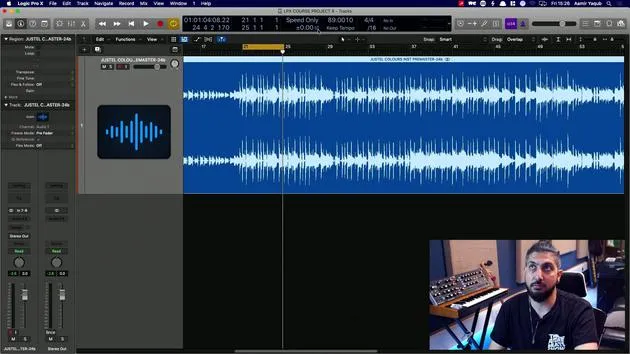
There's another very interesting feature in Logic that can really help you play around with certain aspects, such as tempos where you don't actually have Flex Time on, or it's not an Apple Loop. This feature is Vary Speed.
Step-by-Step Guide
-
Accessing the Feature
- First, go to your LCD and navigate down to Custom.
- You'll notice various options appearing there.
- Right-click on Customize Control Bar and Display.
- In the Custom menu, add Vary Speed.
-
Understanding Vary Speed
- Vary Speed brings up a section that has two different modes.
- You have the ability to change by percentage values or other adjustments.
- For example, let's determine the tempo here, which is approximately 89 BPM.
-
Listening to Sections
- Let's move to a different section of the song from what we heard before, which was just the guitar.
- We'll take the click off to listen more closely.
Options Available
-
Speed Only:
- I have two options here, Vary Speed and Speed and Pitch.
- For now, I'll choose Speed Only since I don't want to alter the pitch.
-
MIDI Information:
- I don't have any MIDI information in this particular session, but if I did, it would speed up or slow down that MIDI data as well.
Adjusting Speed
- Beneath the main controls, there's a percentage value.
- This represents the deviation in percentage of speed.
- You can also adjust it to detune in semitones and change the tuning reference.
Example Settings
- Let's say I want this to speed up by 2%:
- Double-click the percentage field and press 2.
- You will see the orange indicator for the Vary Speed button is now on.
Results
- The audio is now 2% faster, not 2 BPM faster.
- Let's look at what it sounds like:
- If you prefer this sped-up version, that's great!
Speed and Pitch Adjustment
- You can also choose to speed and pitch.
- This will change the pitch along with the speed when you enable this option.
Checking the Resulting BPM
- If you think this 2% faster setting works well, what is the new BPM?
- Let's check:
- It's actually sped up to 90.90.781.
- Essentially, you have sped this up by a couple of BPM, and it sounds good!
Conclusion
Vary Speed is a very handy feature; it's derived from the functionality of tape machines. It's an excellent tool to quickly evaluate if your session will sound better at a different speed and pitch.
14 lecciones
1h 22m de lecciones en vídeo estructuradas
Funciones de vídeo avanzadas
Ralentiza, repite un pasaje, sigue la partitura
Móvil, tablet y ordenador
Practica donde quieras
Garantía de satisfacción 100%
30 días de garantía de devolución
Conoce a tu gurú
Conoce a tu gurú
Aamir Yaqub es un productor e ingeniero musical afincado en Londres. Ha trabajado con algunos de los nombres más grandes de la música, entre ellos Alicia Keys, David Guetta, Rihanna, Sia y will.i.am, además de desarrollar a artistas independientes.
A lo largo de sus cursos enseña su flujo de trabajo completo en Logic Pro: desde la interfaz y la grabación, pasando por la creación de ritmos, la síntesis y los efectos MIDI, hasta la mezcla y el acabado de un tema.







