



Smart Tempo

Con
Aamir Yaqub
Qué incluye el curso
14 lecciones (1h 22m) · 1 gratis
01. Bienvenido a la grabación de audio
0:58
02. Introducción a la grabación de audio
4:47
03. Usar el metrónomo
5:00
04. Hacer tu primera grabación
Lección gratis5:32
05. Comping
13:03
06. Editar audio
9:41
07. Gestionar los archivos del proyecto
3:46
08. Grabar una pista de instrumento
2:06
09. Cómo usar Flex Time
10:58
10. Cómo usar Flex Pitch
11:12
11. Convertir el tono en datos MIDI
3:11
12. Smart Tempo
Estás aquí3:04
13. Parámetros y usos de Varispeed
4:08
14. Tempo de proyecto adaptativo
5:00
Transcripción de la lección
Understanding Smart Tempo in Logic
A feature that can be really handy and useful is a feature called Smart Tempo.
Overview
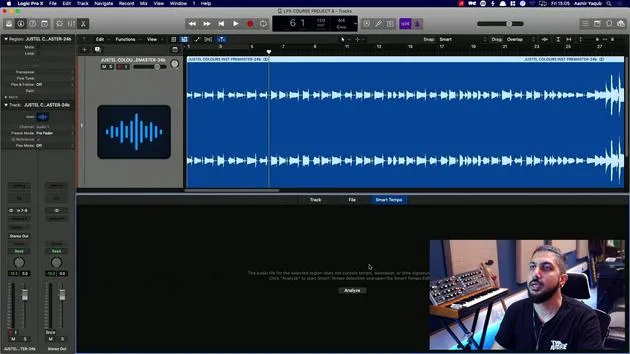
We have a song here, which I produced in Logic. I know the tempo and everything, but I'm pretending that I didn't.
- This audio file has a tempo, which was the tempo that I produced the session at and everything was recorded at.
- Now, I brought this in to show you Smart Tempo because it can allow you to determine the tempo of a file just by reading what's going on in that file.
Accessing Smart Tempo
To access Smart Tempo:
- Double click on the region to open your audio editor window.
- Navigate to the Smart Tempo tab.
At this point, it might not show you anything.
Analyzing the Audio File
You need to say, "I want you to analyze this," because it indicates that there's no tempo information hidden in the data of the file.
- Hit "Analyze."
- The software will go through the file and detect what it considers to be the tempo of the song.
Confirming the Tempo
Now, the song is considered to have a tempo of 89 BPM. You can double-check this by doing the following:
-
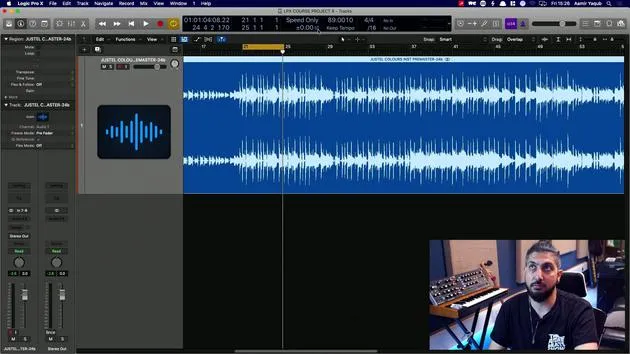
In the edit window, go to Apply Region Tempo to Project Tempo.
- This action will take the tempo determined by Smart Tempo and set it as your project tempo.
-
You will be asked if you want to align the downbeat (i.e., beat one) and if you want to maintain the relative position of any other regions.
- If you don't have any other regions in the track, that option doesn't matter.
- I generally just leave this checked.
Applying the Tempo
Let's apply that. Now, the project tempo has been changed to 89 BPM.
- To double-check if we are correct, press K to turn on the click.
- Listen to the playback.
And lo and behold, we have Smart Tempo working out the tempo of something that has been brought in. That tempo can then be applied to your entire project.
14 lecciones
1h 22m de lecciones en vídeo estructuradas
Funciones de vídeo avanzadas
Ralentiza, repite un pasaje, sigue la partitura
Móvil, tablet y ordenador
Practica donde quieras
Garantía de satisfacción 100%
30 días de garantía de devolución
Conoce a tu gurú
Conoce a tu gurú
Aamir Yaqub es un productor e ingeniero musical afincado en Londres. Ha trabajado con algunos de los nombres más grandes de la música, entre ellos Alicia Keys, David Guetta, Rihanna, Sia y will.i.am, además de desarrollar a artistas independientes.
A lo largo de sus cursos enseña su flujo de trabajo completo en Logic Pro: desde la interfaz y la grabación, pasando por la creación de ritmos, la síntesis y los efectos MIDI, hasta la mezcla y el acabado de un tema.







