



Comprendre le navigateur - Gérer les fichiers

Avec
Isaac Cotec
Le contenu du cours
20 leçons (2h 16min) · 1 gratuites

Transcription de la leçon
Understanding Factory Packs in Ableton Live
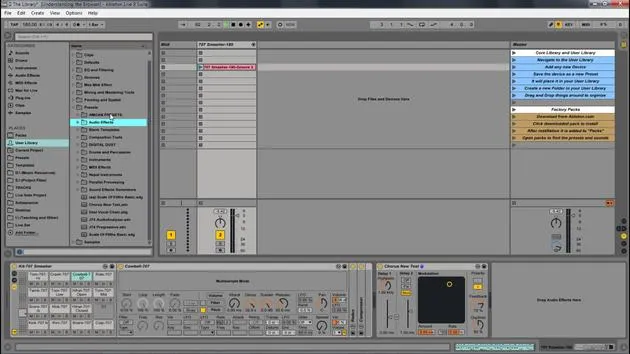
So let's look at Factory Packs in the browser. Under Places, you have this thing called the Packs.
What are Packs?
This is where all packs that you have purchased or downloaded from Ableton Live can be stored and installed. Each pack appears as a folder and can be unfolded to show the pack's content.
- You have presets
- You have samples
- You have Live Clips
Installed Packs will also appear in the appropriate category when labeled.
"If you install an official Ableton Live pack, it's going to install it here and then you can see it within your packs within your browser. It will also install any presets into your categories."
Creating and Managing Your Own Live Packs
Now, when you create your own Live pack, it will not install into the Factory Pack.
- It is best to install them in your own User Library
- Or make your own folder for templates and packs.
Now, if your friend makes a Live pack and sends it to you, and you install it , or if you visit my site sabiquiousmusic.com where I have tons, I think I have over a hundred free Live packs , if you install those, it will not go into Packs.
Important Note:
- Packs is only for official Factory packs from Ableton.com.
- You can install any downloaded pack anywhere you want, and then place it in your User Library or another folder.
For me, I have a Templates Folder which is where I keep any templates that I want to maintain as a Live pack.
Downloading Packs from Ableton
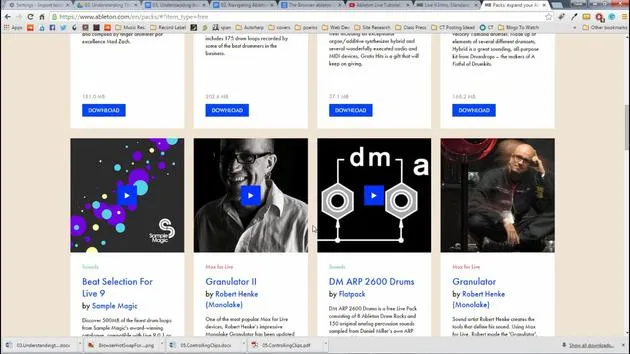
You can always get packs from ableton.com. Once you go into Packs, it will list all available options. There are quite a few free downloads that you can just download.
- It's very easy to navigate this:
- Press Free to see all the free packs , tons of different samples, gigs worth of samples, presets, and things to play with.
You can also order different packs through Ableton.
Download Process
When you find something you like, such as a specific sound library:
- Click Download.
- You may need to log in.
- Once downloaded, double-click the file, and it will open Ableton Live to install.
"It's going to install it wherever you set your packs within Live."
- It might ask you where to set your packs' installation folder.
- Once installed, you'll get all the presets within your categories as well as be able to find them within Packs.
Managing Your Files and Live Sets
Now, within Packs, we have those solid sounds.
The types of documents that you create and work on in Live are called a Live Set. Think of this as a single song.
File Management
- Sets must be saved inside a Project so that Live can keep track of and manage all of the various components, such as:
- Live clips
- Devices
- Presets
- Samples used, etc.
This image represents a folder, which is your Live Project. Within that project, you usually have three folders:
- Live Project
- Info Samples
- Ableton Live Set
You might have more folders depending on your samples, Max for Live, or other factors. Your Live Set is found within the folder that is your project.
Example Project Structure
Here's another way of looking at it:
- Project: Electro with Piano Project
- ALS file (which is a Live set): Electro with Piano Live Set
You'll notice that many of the different projects shared here are folders that say Project. When you click them, they contain all the different Live sets.
For instance:
- In this case, I have four Live sets.
- The folder contains "Navigating what is a clip" and so on.
When I click those, those are the sets that I play with.
Remember: All samples and everything I've used in these Live sets are kept within the project. All samples for all four of these Live sets are found in the Samples folder.
20 leçons
2h 16m de leçons vidéo structurées
Fonctions vidéo avancées
Ralentissez, bouclez un passage, suivez la partition
Mobile, tablette et ordinateur
Pratiquez où vous voulez
Satisfaction garantie à 100 %
Garantie remboursement 30 jours
Rencontrez votre guru
Rencontrez votre guru
Isaac Cotec est, sans doute, l'un des meilleurs formateurs Ableton au monde ! Tout en travaillant sur sa propre musique, il a commencé à enseigner les techniques d'enregistrement, le design sonore et Ableton Live à des élèves particuliers et, depuis qu'il a obtenu sa certification d'Ableton Certified Trainer officiel, il a aidé des milliers de producteurs à passer un cap et à réussir comme musiciens.
Isaac a commencé à produire de la musique électronique en 2005 avec Psyche Sonics, un groupe expérimental travaillant sur la science et la recherche des binaural beats et la modification de la conscience par le son. Après avoir tourné, il a continué à écrire de la musique sous l'alias Cotec puis a émergé comme l'artiste Subaqueous, mêlant son passé électronique à des techniques de production à la fois futuristes et organiques. À ce jour, il a sorti 3 albums et 4 EPs.
Isaac est aussi le fondateur et le gérant du label Invibe Music, qui représente certains des meilleurs artistes de musique électronique du Pacific Northwest et se spécialise dans la dance midtempo.
Dans ses cours Ableton Live, Isaac partage les techniques de production, de design sonore et d'écriture qu'il a passé des années à affiner — les compétences mêmes qu'il utilise pour transformer l'étincelle d'une idée en un morceau fini.







