Sculpture, EVOC20 y vocoding

Con
Aamir YaqubAamir explora Sculpture de Logic y el vocoder EVOC 20, mostrando cómo la síntesis por modelado simula cuerdas reales en vibración para crear desde arpas hasta timbres de otro mundo.
Qué incluye el curso
20 lecciones (1h 47m) · 1 gratis
01. Bienvenido a la síntesis
Lección gratis0:53
02. Introducción a la síntesis, síntesis sustractiva
3:22
03. Primera etapa: generación de tono
4:09
04. Segunda etapa - Modelado del tono y filtros
1:35
05. Modelar el volumen - ADSR
3:27
06. LFOs
1:54
07. Alchemy
4:11
08. Retro synth
4:55
09. Sintetizadores ES1 y ES2
4:00
10. Sintetizador ESP
1:17
11. ESM, ESE, EFM1
8:54
12. Sculpture, EVOC20 y vocoding
Estás aquí7:53
13. Drum Synth y Ultrabeat
7:11
14. Drum Kit and Drum Machine Designer
7:23
15. Sintetizadores de teclado: órgano vintage, EP, Clav, Mellotron
9:03
16. Studio Horns y Studio Strings
4:48
17. Efectos MIDI - Arpegiador
21:21
18. Efectos MIDI - Chord Trigger
5:45
19. Otros efectos MIDI
4:33
Transcripción de la lección
Exploring Modeling Synthesis with Sculpture
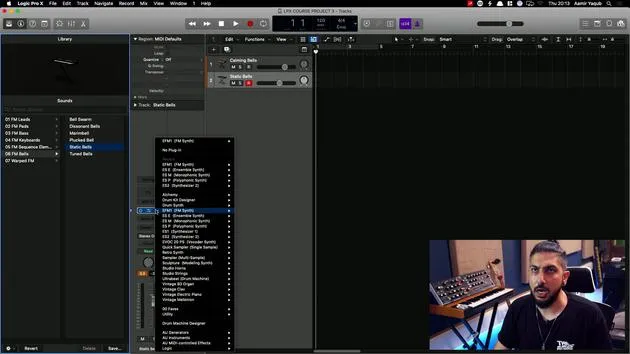
I'm going to load up one of the synths that is a modeling synth within Logic, called Sculpture. This is a very interesting synth because it operates on modeling synthesis.
What is Modeling Synthesis?
Essentially, sounds are generated by simulating the physical properties of an instrument or a vibrating string.
- It's component modeling, which means you can create an instrument made of metal that behaves like a bowed instrument.
- This opens up a lot of sound design possibilities for you to explore.
Sound Design Potential
With a synth like this, you can create sounds that are:
- Fairly realistic, perfect for mimicking instruments like a harp.
- Otherworldly, sounds that don't exist but sit somewhere between acoustic and synthesized.
The concept of this is obviously fantastic.
Exploring Presets
If you look in the presets and navigate to bowed instruments, for instance, and then to Ambient Slow Bow, you'll notice it possesses properties of a flute, a guitar, and a violin all combined.
Similarly, if you select Sci-Fi Mystery, you'll find a level of acousticness, along with an ethereal quality.
Key Features
Within Sculpture:
- You have many familiar aspects present in Logic's other synths.
- Choose your sound sources, not through waveforms but by attributes like:
- The timbre of the object
- The material (e.g., nylon, wood)
Additionally, you can adjust parameters using familiar elements such as ADSR.
Sculpture is certainly a very interesting instrument to get your hands on!
Introduction to Vocoders with Evok 20PS
The last synth we will discuss is the Evok 20PS, which is a vocoder synth.
What is a Vocoder?
Vocoders are unique because they do not use a waveform for tone generation; instead, they use a voice.
- This could be your voice or someone else's.
- The concept was popularized by artists like Kraftwerk and has continued through to Daft Punk.
Setting Up Your Vocoder
Basic Concept
The basic concept of a vocoder is simple:
- Input a voice (this can be spoken or sung).
- When you do, the synth will generate sounds based on the information you are playing on your MIDI keyboard, allowing you to hear it back as a synthesized sound.
Practical Example
- I have taken some Apple Loops of someone speaking German from 1 to 10.
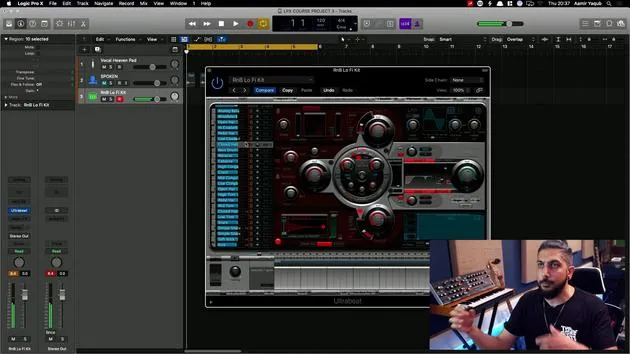
- This person is speaking, not singing, and I have my Evok 20 set up on Instrument 2.
Side Chaining
- To get this sound into the synth, I need to sidechain this vocal track into my synth.
- Sidechaining is a process we will explore further later on.
To sidechain:
- Go to Audio, and then select the track (e.g., German Number).
- If I rename the track to Spoken, it will update accordingly.
At this point, the vocal is feeding into the synth. However, I don't want to hear the original vocal anymore, so I will mute it.
Mute the Original Vocal
You might think that if I mute it, I won't hear anything. However, since I've sidechained the vocal into the vocoder,
- The original vocal no longer needs to be audible; it's just feeding into the synth.
Triggering the Synth
- Press play. But wait... I can't hear anything! Why?
- My original vocal is muted, and I'm not entering any MIDI data to trigger my synth.
So, I will select Vintage Vocoder and then go to Vocal Heaven Pad, a good starting place.
Final Steps
- Make sure I've selected my synth track, as this will receive the MIDI information.
- Press play, then try playing some chords, and it should now work!
What you're experiencing is that the vocoder requires input from both the spoken word and your MIDI keyboard in order to synthesize the voice.
Conclusion
There are endless possibilities with the vocoder, enabling you to explore various sounds. You could hold a really low note and already hear echoes of all the records that have used vocoders since they were first brought to popularity.
20 lecciones
1h 47m de lecciones en vídeo estructuradas
Funciones de vídeo avanzadas
Ralentiza, repite un pasaje, sigue la partitura
Móvil, tablet y ordenador
Practica donde quieras
Garantía de satisfacción 100%
30 días de garantía de devolución
Conoce a tu gurú
Conoce a tu gurú
Aamir Yaqub es un productor e ingeniero musical afincado en Londres. Ha trabajado con algunos de los nombres más grandes de la música, entre ellos Alicia Keys, David Guetta, Rihanna, Sia y will.i.am, además de desarrollar a artistas independientes.
A lo largo de sus cursos enseña su flujo de trabajo completo en Logic Pro: desde la interfaz y la grabación, pasando por la creación de ritmos, la síntesis y los efectos MIDI, hasta la mezcla y el acabado de un tema.