ESM, ESE, EFM1

Con
Aamir YaqubAamir Yaqub explora tres de los sintetizadores integrados de Logic Pro, el ESM, el ESE y el EFM1, y los sonidos de bajo, lead y texturas que puedes conseguir con ellos.

Qué incluye el curso
20 lecciones (1h 47m) · 1 gratis
01. Bienvenido a la síntesis
Lección gratis0:53
02. Introducción a la síntesis, síntesis sustractiva
3:22
03. Primera etapa: generación de tono
4:09
04. Segunda etapa - Modelado del tono y filtros
1:35
05. Modelar el volumen - ADSR
3:27
06. LFOs
1:54
07. Alchemy
4:11
08. Retro synth
4:55

09. Sintetizadores ES1 y ES2
4:00
10. Sintetizador ESP
1:17
11. ESM, ESE, EFM1
Estás aquí8:54
12. Sculpture, EVOC20 y vocoding
7:53
13. Drum Synth y Ultrabeat
7:11
14. Drum Kit and Drum Machine Designer
7:23
15. Sintetizadores de teclado: órgano vintage, EP, Clav, Mellotron
9:03
16. Studio Horns y Studio Strings
4:48
17. Efectos MIDI - Arpegiador
21:21
18. Efectos MIDI - Chord Trigger
5:45
19. Otros efectos MIDI
4:33
Transcripción de la lección
Music Lesson: Exploring ESM and EFM Synths
Loading ESM
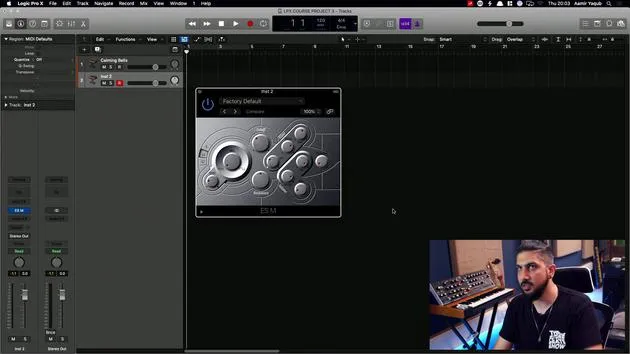
Okay, so next up, I'm going to load ESM. ESM is a monophonic synth. Remember, monophonic means one voice at one time. This is good for bass and lead sounds, particularly.
It really is a bit of a hidden gem. You can:
- Get bass that slides and glides
- Easily create textures and layers
One of my favorite settings here is the House Organ. There's a rich harmonic quality to this synth that is quite underrated. You could:
- Take a basic bass sound
- Play it higher up, and it sometimes works quite nicely as a lead.
If I was using a lead sound, I'd make the cutoff higher to get more of that sound out of it.
You also have some nice features like overdrive, which allows you to get more crunch and rich harmonics out of the sound.
Be careful of the level, though. It's quite loud. So, ESM is another great one to mess around with. When you work with the glide functionality, it's endless fun!
Pad Sounds: Loading ESE
Now, let's load up ESE, which you can see is an ensemble synth.
This one is really nice for pads. Because it's an ensemble synth, it sounds like there are more voices than there actually are.
You can hear it has that rich, rounded sound already. For instance, if I select a basic soft pad:
- This is a really good starting point for you to create your own sounds.
- Work further with synthesis and sound design.
The chorus effect on that pad makes it feel like it's moving. I might even increase the attack time here so it feels like it's creeping up.
You can do lovely things like that; it's basically a pad machine for me. Check it out on the basic soft pad and play around with some parameters, particularly attack and release, to give it that feeling of a string section coming in and out.
Exploring EFM1
Another one in the E series is EFM1. It's an FM synth, which is a form of synthesis. This one is great for sounds that are:
- A bit more bell-like
- More digital, yet rich
FM synthesis was very synonymous with the 80s. You can load any pad, and you'll get that same nostalgic feeling.
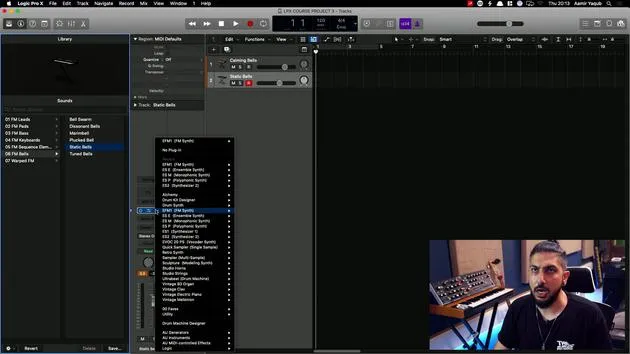
For example, if I select Static Bells, you get that very digital feeling in the top end. There is something about many synths from the 80s that have that quality.
You can also create nice lead sounds out of EFM1. It's versatile enough to produce bass sounds as well. Personally, I love creating some keyboard-like sounds on this synth because FM synths excel with those.
Navigating Logic's Presets
As you've seen me, I've been going through some of these presets by bringing this down and exploring different categories.
For instance, if I want to go into another section, let's check out the sequence elements.
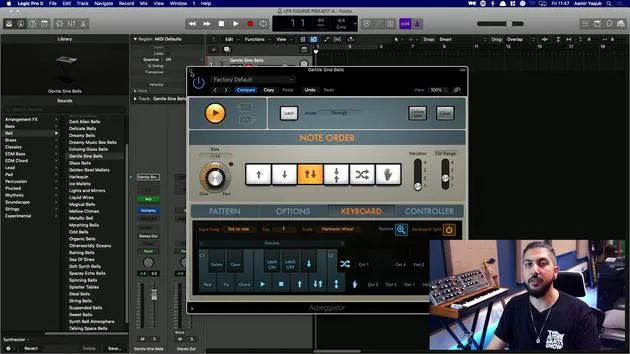
I'm going to open the library, which is very handy when working with certain instruments and plugins:
- It shows you all available presets.
At this moment, this would change the patch and the entire channel strip. This little triangle here indicates that it will introduce a new patch.
If I want to stay in EFM1, I simply bring my mouse down, and a little gray triangle appears.
By clicking on that, I can look at all of the presets for EFM1. For instance, I can go back to Bells, click on Bell Swarm, and play around with it.
Using the down arrow, I can navigate to the next sound, and so on.
The library is brilliant when you're working within Logic's own plugins and synths!
20 lecciones
1h 47m de lecciones en vídeo estructuradas
Funciones de vídeo avanzadas
Ralentiza, repite un pasaje, sigue la partitura
Móvil, tablet y ordenador
Practica donde quieras
Garantía de satisfacción 100%
30 días de garantía de devolución
Conoce a tu gurú
Conoce a tu gurú
Aamir Yaqub es un productor e ingeniero musical afincado en Londres. Ha trabajado con algunos de los nombres más grandes de la música, entre ellos Alicia Keys, David Guetta, Rihanna, Sia y will.i.am, además de desarrollar a artistas independientes.
A lo largo de sus cursos enseña su flujo de trabajo completo en Logic Pro: desde la interfaz y la grabación, pasando por la creación de ritmos, la síntesis y los efectos MIDI, hasta la mezcla y el acabado de un tema.