



Smart Tempo

Mit
Aamir Yaqub
Das steckt im Kurs
14 Lektionen (1h 22m) · 1 gratis
01. Willkommen beim Aufnehmen von Audio
0:58
02. Einführung in die Audioaufnahme
4:47
03. Das Metronom verwenden
5:00

04. Deine erste Aufnahme machen
Gratis-Lektion5:32
05. Comping
13:03
06. Audio bearbeiten
9:41
07. Projektdateien verwalten
3:46
08. Eine Instrumentenspur aufnehmen
2:06
09. So verwendest du Flex Time
10:58
10. So verwendest du Flex Pitch
11:12
11. Tonhöhe in MIDI-Daten umwandeln
3:11
12. Smart Tempo
Du bist hier3:04
13. Varispeed-Parameter und -Anwendungen
4:08
14. Adaptives Projekttempo
5:00
Transkript der Lektion
Understanding Smart Tempo in Logic
A feature that can be really handy and useful is a feature called Smart Tempo.
Overview
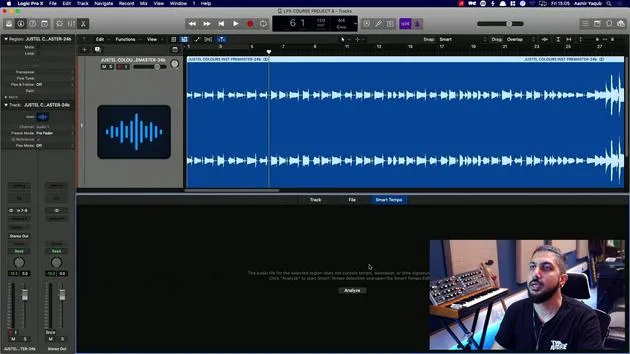
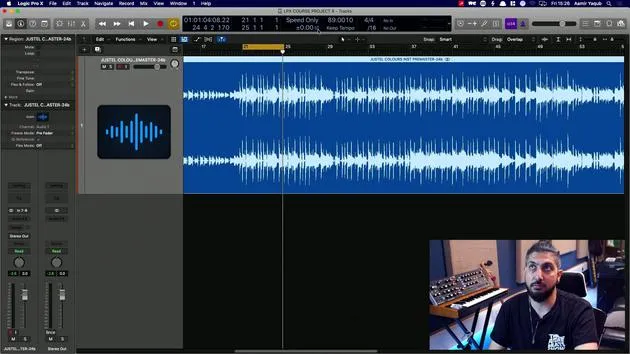
We have a song here, which I produced in Logic. I know the tempo and everything, but I'm pretending that I didn't.
- This audio file has a tempo, which was the tempo that I produced the session at and everything was recorded at.
- Now, I brought this in to show you Smart Tempo because it can allow you to determine the tempo of a file just by reading what's going on in that file.
Accessing Smart Tempo
To access Smart Tempo:
- Double click on the region to open your audio editor window.
- Navigate to the Smart Tempo tab.
At this point, it might not show you anything.
Analyzing the Audio File
You need to say, "I want you to analyze this," because it indicates that there's no tempo information hidden in the data of the file.
- Hit "Analyze."
- The software will go through the file and detect what it considers to be the tempo of the song.
Confirming the Tempo
Now, the song is considered to have a tempo of 89 BPM. You can double-check this by doing the following:
-
In the edit window, go to Apply Region Tempo to Project Tempo.
- This action will take the tempo determined by Smart Tempo and set it as your project tempo.
-
You will be asked if you want to align the downbeat (i.e., beat one) and if you want to maintain the relative position of any other regions.
- If you don't have any other regions in the track, that option doesn't matter.
- I generally just leave this checked.
Applying the Tempo
Let's apply that. Now, the project tempo has been changed to 89 BPM.
- To double-check if we are correct, press K to turn on the click.
- Listen to the playback.
And lo and behold, we have Smart Tempo working out the tempo of something that has been brought in. That tempo can then be applied to your entire project.
14 Lektionen
1 Std. 22 Min. strukturierte Videolektionen
Erweiterte Videofunktionen
Verlangsamen, Passagen loopen, mitlesen
Handy, Tablet & Desktop
Üben, wo du willst
100 % Zufriedenheitsgarantie
30 Tage Geld-zurück-Garantie
Lern deinen Guru kennen
Lern deinen Guru kennen
Aamir Yaqub ist ein in London ansässiger Musikproduzent und Toningenieur. Er hat mit einigen der größten Namen der Musik gearbeitet, darunter Alicia Keys, David Guetta, Rihanna, Sia und will.i.am, und fördert außerdem unabhängige Künstler.
In seinen Kursen vermittelt er seinen kompletten Logic-Pro-Workflow – von der Oberfläche und dem Aufnehmen über Beatmaking, Synthese und MIDI-Effekte bis zum Mixing und Finalisieren eines Tracks.







