



MIDI-Effekte und das Ändern von MIDI-Daten

Mit
Isaac CotecIsaac zeigt, wie die MIDI-Effekte von Live, etwa der Arpeggiator, deine MIDI-Daten verändern, bevor sie das Instrument erreichen – und das völlig zerstörungsfrei.
Das steckt im Kurs
17 Lektionen (1h 33m) · 1 gratis
Transkript der Lektion
Exploring MIDI Effects in Ableton Live
So that is the grid within Ableton Live. Now let's look at adding MIDI effects.
What Are MIDI Effects?
MIDI effects can change the incoming MIDI before it reaches the instrument.
- If you hold a single note, you can add a MIDI effect to:
- Arpeggiate the note
- Apply various transformations to the note information
This process is non-destructive. In other words, it does not change the note; it just changes what Live does with it. You can always go back and change this parameter later.
Demonstrating MIDI Effects
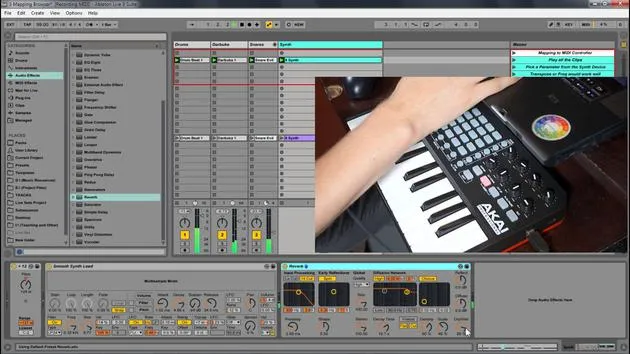
Let's use this controller as a visual way of showcasing the MIDI effects.
-
Access MIDI Effects:
- Go into the MIDI effects section in the browser.
- Select Arpeggiator.
-
Initial Playthrough:
- First of all, I'm just going to play a note. When I hold it, it plays all the way through.
-
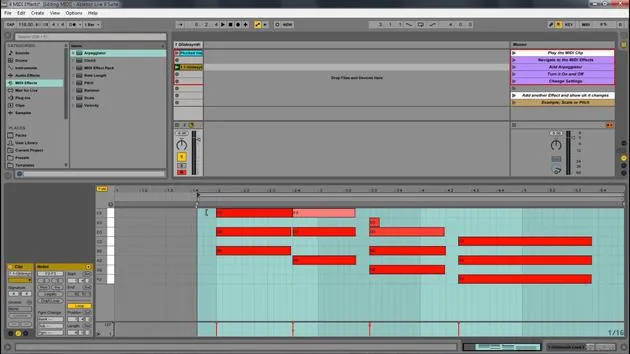
Positioning the Arpeggiator:
- Let's put our arpeggiator before the synth.
- The Arpeggiator acts as an intermediary between pressing a note and the actual sound output.
- It takes the MIDI information and changes those parameters to output new information for the synth.
This can be a great way to create interesting arpeggios!
Recording and Quantizing
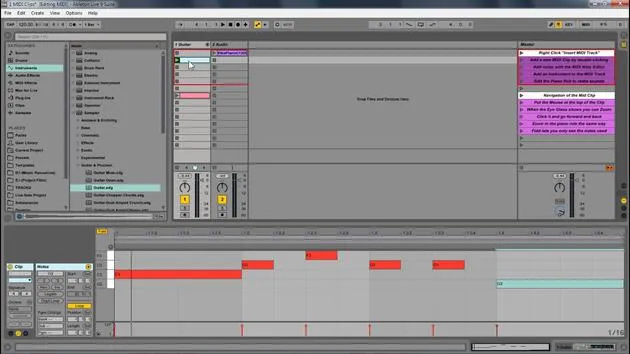
If I press record, you'll notice that I have the MIDI here, but it isn't showing all that arpeggiation and movement.
- What this means is I will quickly select this and quantize it.
- Just like we can quantize audio, we can right-click and quantize MIDI.
Now I'm going to move these things around just to enhance the example. Since those original notes are there, I can come in here and change the parameters:
- Change the rate
- Experiment with swing
Non-destructive Editing
Now, that's a completely different Arpeggiator. If I come over here to view the notes, you'll notice they're exactly the same. This showcases the non-destructive nature of MIDI effects.
Exploring Additional MIDI Effects
With the same concept in mind, let's quickly look at some other MIDI effects:
-
Note Length: Affects the length of the note.
-
Randomizer:
- Let's turn off the Arpeggiator and select these notes.
- The notes that play are not the same notes; they simply randomize whenever a note is triggered.
-
Pitch Shift:
- We can lower and raise the pitch. For example, if a note is a C, a shift of +12 will put it up an octave.
-
Scale:
-
Dragging in Scale allows you to specify where the notes fit.
-
Let's speed this up now. Opening the scale, I can choose different options.
-
For instance, putting it in blue scale. This takes all incoming notes and constrains them to fit that scale.
-
There are no wrong notes outside of this scale. Traditionally, sequences go like this: B note → A note → B → C, and so on.
-
But when I apply the scale, it adjusts those notes, ensuring they stay within the dictated scale parameters.
-
Conclusion
You can see how we can:
- Change out the MIDI effects
- Delete them
- Tweak the parameters
All while keeping the original MIDI intact. The MIDI information gets processed through these effects and is then sent to your instrument.
17 Lektionen
1 Std. 33 Min. strukturierte Videolektionen
Erweiterte Videofunktionen
Verlangsamen, Passagen loopen, mitlesen
Handy, Tablet & Desktop
Üben, wo du willst
100 % Zufriedenheitsgarantie
30 Tage Geld-zurück-Garantie
Lern deinen Guru kennen
Lern deinen Guru kennen
Isaac Cotec ist wohl einer der besten Ableton-Trainer der Welt! Während er an seiner eigenen Musik arbeitete, begann er, Privatschülern Aufnahmetechniken, Sounddesign und Ableton Live beizubringen, und seit seiner Zertifizierung als offizieller Ableton Certified Trainer hat er Tausenden von Produzenten geholfen, ihr Niveau zu steigern und als Musiker erfolgreich zu sein.
Isaac begann 2005 mit Psyche Sonics elektronische Musik zu produzieren, einer experimentellen Gruppe, die sich mit der Wissenschaft und Erforschung binauraler Beats und der Bewusstseinsveränderung durch Klang beschäftigte. Nach dem Touren schrieb er weiter Musik unter dem Alias Cotec und trat später als Künstler Subaqueous hervor, der seine elektronische Vergangenheit mit zukunftsgewandten wie organischen Produktionstechniken verband. Bis heute hat er 3 Alben und 4 EPs veröffentlicht.
Isaac ist außerdem Gründer und Manager des Plattenlabels Invibe Music, das einige der besten Elektronik-Künstler des Pacific Northwest vertritt und sich auf Midtempo-Dance-Musik spezialisiert.
In seinen Ableton-Live-Kursen teilt Isaac die Produktions-, Sounddesign- und Songwriting-Techniken, die er über Jahre verfeinert hat – genau jene Fähigkeiten, mit denen er aus dem Funken einer Idee einen fertigen Track macht.







