



Setting up Reverb Bus with a Send

With
Aamir YaqubAamir Yaqub shows how to set up a reverb on a send in Logic Pro, routing tracks to a ChromaVerb aux for more control over the sound and a lighter CPU load.
What's in the course
16 lessons (1h 33m) · 1 free
01. Welcome to audio Effects
Free lesson0:46
02. Audio Effects
3:00
03. Using the Multi Effects - Phat FX and Step FX
5:11
04. Setting up Reverb Bus with a Send
You are here3:58
05. Using Reverbs in Logic Pro
3:27
06. Using Delays in Logic Pro
8:02
07. Distortion plugins
6:35
08. Filter plugins
5:35

09. Distortion and Filters outro
0:30
10. Modulation plugins
12:54
11. Pitch plugins
6:50

12. Modulation and Pitch outro
1:03
13. Amps and Pedal effects
10:38
14. Specialised effects
5:49
15. EQs (Equalizers)
7:18
16. Dynamics and Compression
11:43
Lesson transcript
Understanding Reverb Effects in Logic
Introduction to Reverb Effects
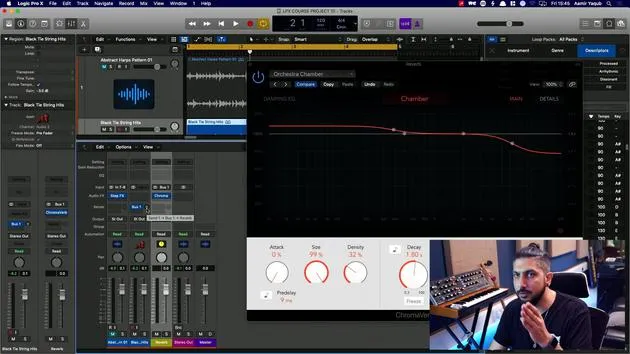
So let's start by looking at reverb effects that are available to you in Logic. One important aspect of reverb effects is that if you add them directly to a track, you actually have less control over the sound of the reverb. This is crucial, especially when mixing and trying to tie instruments together.
Sending Reverb via a Send
- To achieve better control, you want to send your reverb via a send.
- This feature is found in the channel strip under the audio effects.
Setting Up a Reverb on a Send
-
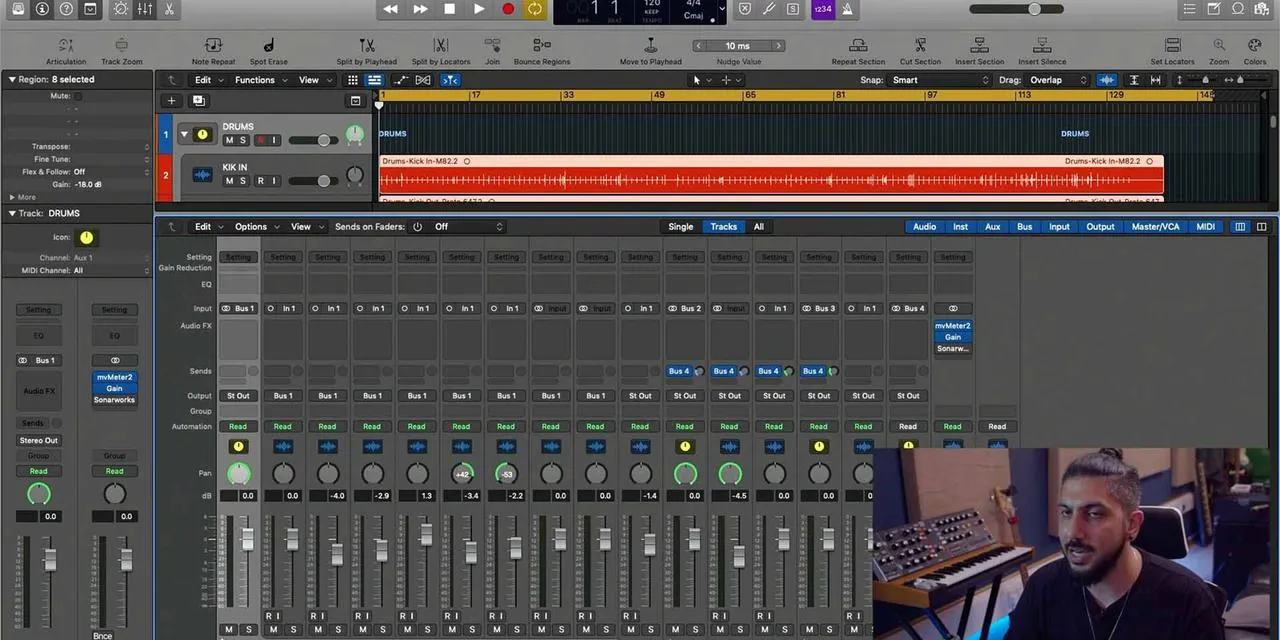
Open the Mixer View:
- This helps visualize the setup.
- You can see your audio track and the auxiliary track feeding in from bus one.
-
Create the Reverb Track:
- Rename the auxiliary track to Reverb.
- Insert a reverb effect at the beginning of the audio effects chain.
- Choose the first available reverb effect, which is ChromaVerb.
-
Sending the Dry Signal to Reverb:
- You need to send some of the dry signal (the original sound) into the reverb.
- This process splits the signal into:
- Dry Signal: Original sound
- Wet Signal: Reverb-affected sound
Benefits of Using a Send
- Independent Control: You can process the dry signal with any audio effects you want.
- CPU Optimization:
- If you had 100 tracks with individual reverbs, your computer might struggle.
- Instead, using a few reverb sends for multiple tracks reduces CPU load.
Enhancing Your Mix
- By sending different instruments to the same reverb, you can tie together the sound better.
- Currently, there is no reverb on the strings.
Selecting a Reverb Preset
- Choose a preset, such as a chamber for an orchestra.
- Adjust the send pot:
- Click and drag up to send an amount of the dry signal into the reverb.
Listening and Adjusting
- You can hear the reverb effect applied now.
- To hear the original signal, simply mute the reverb.
- To listen to the reverb by itself, press solo on the reverb track.
- You can adjust the balance or amount of reverb using either the reverb track fader or the send pot.
Conclusion
That's how you would set up a send, particularly for a reverb and for a delay. This method not only enhances your mixing capabilities but also helps maintain the integrity of your sound!
16 lessons
1h 33m of structured video lessons
Advanced video features
Slow down, loop a passage, follow along
Mobile, tablet & desktop
Practise wherever you are
100% satisfaction guarantee
30-day money-back guarantee
Meet your guru
Meet your guru
Aamir Yaqub is a music producer and engineer based in London. He has worked with some of the biggest names in music, including Alicia Keys, David Guetta, Rihanna, Sia and will.i.am, as well as developing independent artists.
Across his courses he teaches his complete Logic Pro workflow - from the interface and recording through beat-making, synthesis and MIDI effects to mixing and finishing a track.