



Paramètres et usages de Varispeed

Avec
Aamir Yaqub
Le contenu du cours
14 leçons (1h 22min) · 1 gratuites
01. Bienvenue dans l'enregistrement audio
0:58
02. Introduction à l'enregistrement audio
4:47
03. Utiliser le métronome
5:00

04. Faire ton premier enregistrement
Leçon gratuite5:32
05. Comping
13:03
06. Éditer l'audio
9:41
07. Gérer les fichiers du projet
3:46
08. Enregistrer une piste d'instrument
2:06
09. Comment utiliser Flex Time
10:58
10. Comment utiliser Flex Pitch
11:12
11. Convertir la hauteur en données MIDI
3:11
12. Smart Tempo
3:04
13. Paramètres et usages de Varispeed
Tu es ici4:08
14. Tempo de projet adaptatif
5:00
Transcription de la leçon
Exploring Vary Speed in Logic
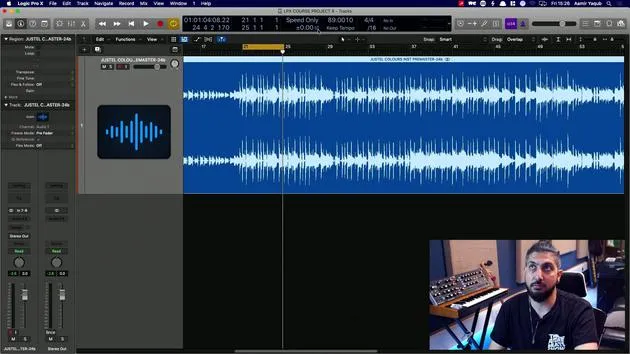
There's another very interesting feature in Logic that can really help you play around with certain aspects, such as tempos where you don't actually have Flex Time on, or it's not an Apple Loop. This feature is Vary Speed.
Step-by-Step Guide
-
Accessing the Feature
- First, go to your LCD and navigate down to Custom.
- You'll notice various options appearing there.
- Right-click on Customize Control Bar and Display.
- In the Custom menu, add Vary Speed.
-
Understanding Vary Speed
- Vary Speed brings up a section that has two different modes.
- You have the ability to change by percentage values or other adjustments.
- For example, let's determine the tempo here, which is approximately 89 BPM.
-
Listening to Sections
- Let's move to a different section of the song from what we heard before, which was just the guitar.
- We'll take the click off to listen more closely.
Options Available
-
Speed Only:
- I have two options here, Vary Speed and Speed and Pitch.
- For now, I'll choose Speed Only since I don't want to alter the pitch.
-
MIDI Information:
- I don't have any MIDI information in this particular session, but if I did, it would speed up or slow down that MIDI data as well.
Adjusting Speed
- Beneath the main controls, there's a percentage value.
- This represents the deviation in percentage of speed.
- You can also adjust it to detune in semitones and change the tuning reference.
Example Settings
- Let's say I want this to speed up by 2%:
- Double-click the percentage field and press 2.
- You will see the orange indicator for the Vary Speed button is now on.
Results
- The audio is now 2% faster, not 2 BPM faster.
- Let's look at what it sounds like:
- If you prefer this sped-up version, that's great!
Speed and Pitch Adjustment
- You can also choose to speed and pitch.
- This will change the pitch along with the speed when you enable this option.
Checking the Resulting BPM
- If you think this 2% faster setting works well, what is the new BPM?
- Let's check:
- It's actually sped up to 90.90.781.
- Essentially, you have sped this up by a couple of BPM, and it sounds good!
Conclusion
Vary Speed is a very handy feature; it's derived from the functionality of tape machines. It's an excellent tool to quickly evaluate if your session will sound better at a different speed and pitch.
14 leçons
1h 22m de leçons vidéo structurées
Fonctions vidéo avancées
Ralentissez, bouclez un passage, suivez la partition
Mobile, tablette et ordinateur
Pratiquez où vous voulez
Satisfaction garantie à 100 %
Garantie remboursement 30 jours
Rencontrez votre guru
Rencontrez votre guru
Aamir Yaqub est un producteur et ingénieur du son basé à Londres. Il a travaillé avec certains des plus grands noms de la musique, dont Alicia Keys, David Guetta, Rihanna, Sia et will.i.am, tout en développant des artistes indépendants.
Au fil de ses cours, il enseigne l'intégralité de son flux de travail sur Logic Pro : de l'interface et de l'enregistrement à la création de beats, la synthèse et les effets MIDI, jusqu'au mixage et à la finalisation d'un morceau.







