



Smart Tempo

Avec
Aamir Yaqub
Le contenu du cours
14 leçons (1h 22min) · 1 gratuites
01. Bienvenue dans l'enregistrement audio
0:58
02. Introduction à l'enregistrement audio
4:47
03. Utiliser le métronome
5:00

04. Faire ton premier enregistrement
Leçon gratuite5:32
05. Comping
13:03
06. Éditer l'audio
9:41
07. Gérer les fichiers du projet
3:46
08. Enregistrer une piste d'instrument
2:06
09. Comment utiliser Flex Time
10:58
10. Comment utiliser Flex Pitch
11:12
11. Convertir la hauteur en données MIDI
3:11
12. Smart Tempo
Tu es ici3:04
13. Paramètres et usages de Varispeed
4:08
14. Tempo de projet adaptatif
5:00
Transcription de la leçon
Understanding Smart Tempo in Logic
A feature that can be really handy and useful is a feature called Smart Tempo.
Overview
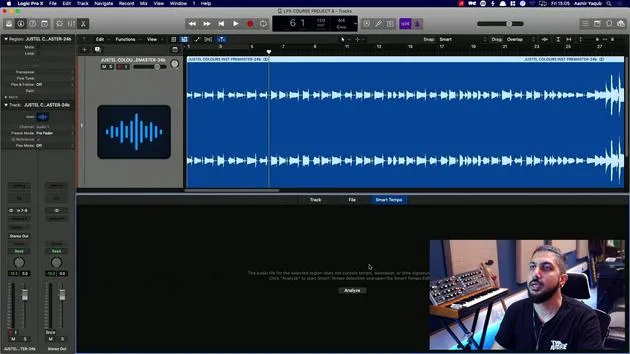
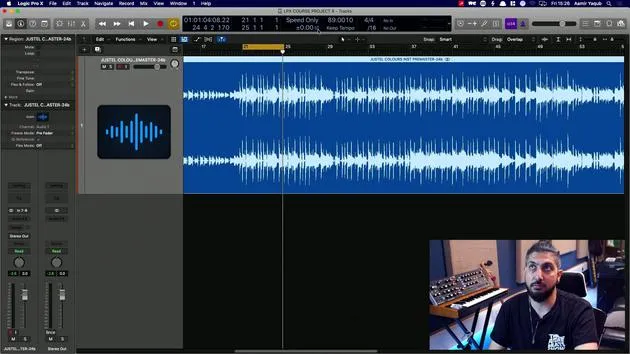
We have a song here, which I produced in Logic. I know the tempo and everything, but I'm pretending that I didn't.
- This audio file has a tempo, which was the tempo that I produced the session at and everything was recorded at.
- Now, I brought this in to show you Smart Tempo because it can allow you to determine the tempo of a file just by reading what's going on in that file.
Accessing Smart Tempo
To access Smart Tempo:
- Double click on the region to open your audio editor window.
- Navigate to the Smart Tempo tab.
At this point, it might not show you anything.
Analyzing the Audio File
You need to say, "I want you to analyze this," because it indicates that there's no tempo information hidden in the data of the file.
- Hit "Analyze."
- The software will go through the file and detect what it considers to be the tempo of the song.
Confirming the Tempo
Now, the song is considered to have a tempo of 89 BPM. You can double-check this by doing the following:
-
In the edit window, go to Apply Region Tempo to Project Tempo.
- This action will take the tempo determined by Smart Tempo and set it as your project tempo.
-
You will be asked if you want to align the downbeat (i.e., beat one) and if you want to maintain the relative position of any other regions.
- If you don't have any other regions in the track, that option doesn't matter.
- I generally just leave this checked.
Applying the Tempo
Let's apply that. Now, the project tempo has been changed to 89 BPM.
- To double-check if we are correct, press K to turn on the click.
- Listen to the playback.
And lo and behold, we have Smart Tempo working out the tempo of something that has been brought in. That tempo can then be applied to your entire project.
14 leçons
1h 22m de leçons vidéo structurées
Fonctions vidéo avancées
Ralentissez, bouclez un passage, suivez la partition
Mobile, tablette et ordinateur
Pratiquez où vous voulez
Satisfaction garantie à 100 %
Garantie remboursement 30 jours
Rencontrez votre guru
Rencontrez votre guru
Aamir Yaqub est un producteur et ingénieur du son basé à Londres. Il a travaillé avec certains des plus grands noms de la musique, dont Alicia Keys, David Guetta, Rihanna, Sia et will.i.am, tout en développant des artistes indépendants.
Au fil de ses cours, il enseigne l'intégralité de son flux de travail sur Logic Pro : de l'interface et de l'enregistrement à la création de beats, la synthèse et les effets MIDI, jusqu'au mixage et à la finalisation d'un morceau.







