



Pre-Fader- vs. Post-Fader-Metering

Mit
Dov WatermanDer Unterschied zwischen Pre-Fader- und Post-Fader-Metering in Logic: Pre-Fader zeigt immer das Quellsignal, während Post-Fader den Pegel nach dem Kanalfader widerspiegelt.
Das steckt im Kurs
14 Lektionen (0h 33m) · 1 gratis
01. Einführung in Mischung und Automation
Gratis-Lektion0:45
02. Der Feinschliff für deinen Track
2:52
03. Den Mix angehen: Ordnung und Pegeleinstellung
6:42
04. Den Schlagzeug-Sound verbreitern
3:47
05. Side-Chaining
2:42
06. Pre-Fader- vs. Post-Fader-Metering
Du bist hier2:45
07. Quantisierung & Flex-Timing
2:05
08. Pegel prüfen, Kompression hinzufügen
1:18
09. Kreative Bearbeitung & Effekte
3:14
10. AUFGABE: Track Alternatives
1:02
Transkript der Lektion
Understanding Pre-Fader and Post-Fader Metering in Mixing Logic
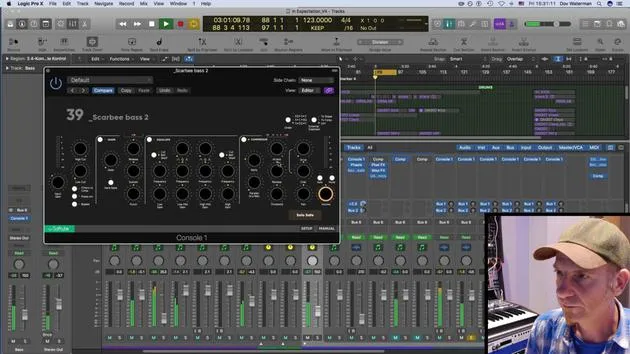
One important aspect to note when mixing in Logic is the choice between pre-fader and post-fader metering.
Post-Fader Metering
- Post-fader metering shows you the signal after it has passed through the channel.
- If you're listening to something and you lower the volume here, it will lower the overall output volume.
Pre-Fader Metering
- Pre-fader metering displays the original output signal, regardless of your fader position.
- No matter where you set the fader, it will always indicate the original signal.
Key Differences
- If you're peaking, the input signal will still show peaking status even if the output volume is low.
- This provides a far better representation of your mixing status and helps you identify any peaking at the main volume.
Example
- For instance, if your fader is down but the meter shows the signal is still up, you can see where the peaks are:
- "Whether I have it up here or down here, it's still going to show me the source signal."
- If I'm peaking over here, even when the volume is very low, I'll be aware of where it is at.
Adjusting Levels
- I might go ahead and adjust whichever instrument is peaking.
- For example, the bass seems to be too high; I can pull it down a bit now.
- Be careful: lowering it here influences the output volume, but the original signal remains high.
Final Adjustments
- The original signal is coming through the ACQ section of my SSL console.
- My approach would be to lower the input signal slightly and perhaps apply a little compression.
- For now, I'll leave the EQ as is since it doesn't bother me much.
- Overall, the signal level is acceptable now.
Let's see how the next instrument is performing.
14 Lektionen
0 Std. 33 Min. strukturierte Videolektionen
Erweiterte Videofunktionen
Verlangsamen, Passagen loopen, mitlesen
Handy, Tablet & Desktop
Üben, wo du willst
100 % Zufriedenheitsgarantie
30 Tage Geld-zurück-Garantie
Lern deinen Guru kennen
Lern deinen Guru kennen
Dov Waterman ist Komponist, Pianist und Produzent. Er hat für Filme wie After Earth, Terminator Genisys, Transformers: The Last Knight und The Snowman Musik geschrieben und das Sounddesign gestaltet und arbeitet als Audio-Editor für Sample-Bibliotheken und Sounddesigner mit Firmen wie Native Instruments und SonoKinetic.
Seine Reihe Composition in Logic geht den Aufbau eines Tracks von Anfang bis Ende in Logic Pro durch – von Templates und Workflow über Synthese und Beat-Programmierung, MIDI-Effekte, Editing bis zum finalen Mix – für Produzenten, die ihre Ideen in fertige Tracks verwandeln möchten.







