MIDI-Effekte - Chord Trigger

Mit
Aamir YaqubAamir Yaqub demonstriert den MIDI-Effekt Chord Trigger von Logic Pro, mit dem du aus einzelnen Tasten vollständige Akkorde spielen kannst – praktisch, wenn du kein Keyboard spielst.
Das steckt im Kurs
20 Lektionen (1h 47m) · 1 gratis
01. Willkommen bei der Synthese
Gratis-Lektion0:53
02. Einführung in die Synthese, subtraktive Synthese
3:22
03. Erste Stufe - Klangerzeugung
4:09
04. Zweite Stufe - Klangformung & Filter
1:35
05. Lautstärke formen - ADSR
3:27
06. LFOs
1:54
07. Alchemy
4:11
08. Retro synth
4:55
09. ES1- und ES2-Synths
4:00
10. ESP-Synthesizer
1:17
11. ESM, ESE, EFM1
8:54
12. Sculpture, EVOC20 und Vocoding
7:53
13. Drum Synth und Ultrabeat
7:11
14. Drum Kit and Drum Machine Designer
7:23
15. Keyboard-Synths: Vintage-Orgel, EP, Clav, Mellotron
9:03
16. Studio Horns und Studio Strings
4:48
17. MIDI-Effekte - Arpeggiator
21:21
18. MIDI-Effekte - Chord Trigger
Du bist hier5:45
19. Weitere MIDI-Effekte
4:33
Transkript der Lektion
Exploring the Chord Trigger MIDI Effect
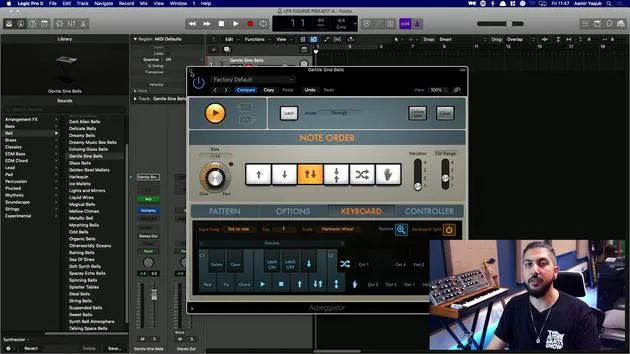
So, coming out of the Arpeggiator, let's look at another really cool and handy MIDI effect: the Chord Trigger.
The Chord Trigger allows us to do something which is particularly useful for those who can't play keyboards. Here's how it works:
Input and Output Keyboards
- I have two keyboards:
- Input Keyboard: Displays all the trigger keys (actually every single key).
- Output Keyboard: Shows the notes being triggered when I press one key.
Essentially, I'm triggering a chord by pressing one note. This is like taking the MIDI data of one note, sending it down the pipeline, and having it split out into different notes that you can define yourself.
For example, if I play a C on my keyboard, I'm holding down one note but getting four notes in return. This results in a C minor chord.
Chord Transposition
As I play, you can hear that the same chord is being transposed up and down the keyboard:
- C minor is on C
- F minor is on F
- G minor is on G
And they're actually minor seven chords, I should mention.
Single Mode vs. Multi Mode
In Single Mode, you can define one single chord, which will be triggered and transposed across the keyboard.
Example: Changing Chords
If you're thinking, "I don't want C minor; I want C major 9," here's what you do:
- Go to the Learn button. It will turn red when clicked.
- Play your C major 9 chord in the first position.
Now, that major 9 chord will be movable all around the keyboard:
- C major 9
- F major 9
- B major 9
And you can obviously hear the effect.
Enhancing with Multi Mode
If you switch into Multi Mode, you get much more versatility in options for your chords and trigger keys.
- Like this, you can define more trigger keys by dragging, expanding your range.
- To clear keys, you can click Clear multiple times.
Defining Chords in Multi Mode
- Go to Learn mode to define what key you want this chord to be on.
- Select your chord.
- Click on the next key to define additional chords.
You can have as many or as few keys as you want, across as many keys as you'd like.
Benefits of Chord Trigger
This feature saves you from needing to play if you're not very good at it, but it also has its own sound and style. Many aspects of chord triggering are synonymous with house music.
Exploring Presets
If you're feeling lazy or wish to explore, you can dive into the Presets.
- Check out the Multi Presets.
- Look under Keyboard Voicings and select Jazz Standard for some interesting chord options.
- Starting from C3, you'll find many different chords available.
You might pick some sounds to create a unique harmonic foundation using those chords.
Additional Options
You can explore various presets, such as Guitar Major Bar Chords, to further expand your creativity.
Conclusion
The Chord Trigger is a fantastic tool. Whether you already know all your chords and can play them or not, it grants you a distinctive sound and style. It can free you up to think differently about the elements of your song.
And if you can't play well initially, it's a great way to incorporate chords from popular songs you love into your productions. Happy playing!
20 Lektionen
1 Std. 47 Min. strukturierte Videolektionen
Erweiterte Videofunktionen
Verlangsamen, Passagen loopen, mitlesen
Handy, Tablet & Desktop
Üben, wo du willst
100 % Zufriedenheitsgarantie
30 Tage Geld-zurück-Garantie
Lern deinen Guru kennen
Lern deinen Guru kennen
Aamir Yaqub ist ein in London ansässiger Musikproduzent und Toningenieur. Er hat mit einigen der größten Namen der Musik gearbeitet, darunter Alicia Keys, David Guetta, Rihanna, Sia und will.i.am, und fördert außerdem unabhängige Künstler.
In seinen Kursen vermittelt er seinen kompletten Logic-Pro-Workflow – von der Oberfläche und dem Aufnehmen über Beatmaking, Synthese und MIDI-Effekte bis zum Mixing und Finalisieren eines Tracks.