



Intro to the Sampler

With
Aamir YaqubAamir Yaqub introduces Logic's full Sampler, from mapping samples across zones to its filters, modulation matrix and synth controls.
What's in the course
12 lessons (0h 56m) · 1 free
Lesson transcript
Understanding the Sampler in Logic
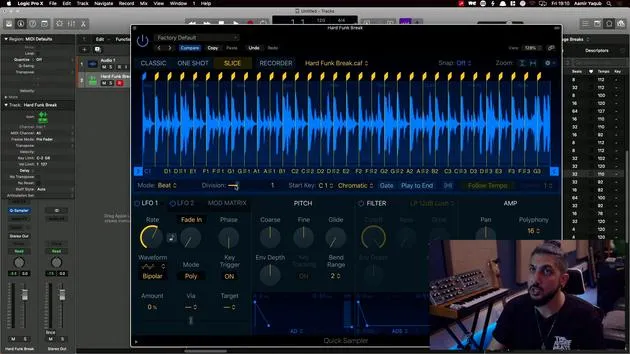
So far, what we've looked at are the two versions of the sampler known as the Quick Sampler.
Accessing the Full Sampler
To work with the actual fully-fledged sampler, you would need to:
- Go to Instruments
- Select Sampler (found down here)
Visual Differences
When you enter the sampler, you'll notice it looks different. Here's what you can expect:
-
Synth Controls and Functionality:
- Pitch
- Filter (multiple types)
-
Modulation Matrix:
- Includes modulators such as LFOs (Low-Frequency Oscillators) and Envelopes.
-
Mapping and Zones:
- This interface allows for detailed adjustments.
Working with Samples
To demonstrate the functionality, let's take the same melody sample of that vocal we used before.
- Drag and drop it onto C3 in the mapping area at the top.
- Move this sample along:
- One octave up
- One octave down
This way, you can re-trigger the sample and map it across your entire keyboard. As a result, you can start to experiment with the entire phrase.
Differences from Quick Sampler
This expanded functionality contrasts with the Quick Sampler, which is more about quickly importing and using a sample. The full sampler allows you to create groups of samples, resulting in what we call multi-sampled instruments.
Multi-Sampling in Logic
Many instruments you find in the Logic library are multi-sampled. For example:
- Go to Factory
- Select Keyboards
- Choose Electric Pianos → Electric Stage Mark 2
When you load that up, you'll see it's based on a sampler instrument, which you'll encounter frequently while exploring the library.
Creating Realistic Instruments
To create a new software instrument track:
- Create a new track
- Open the library
- Access the Piano section
- For instance, select Bosendorfer or Grand Piano
Unique Sounds
What you'll discover is that the sampler helps create realistic instruments using multiple samples of any instrument. This is how all of the samples and sampler instruments were crafted inside Logic.
Encouragement to Explore
I encourage you to:
- Explore both the Quick Sampler and the Sampler.
- Record your own samples!
You might find that knocking on a desk produces a unique sound. You can:
- Record that with a microphone
- Slice it up and put it together as a sampler instrument
- Process it with some audio effects
Before you know it, you'll have a unique sound that is entirely your own.
12 lessons
0h 56m of structured video lessons
Advanced video features
Slow down, loop a passage, follow along
Mobile, tablet & desktop
Practise wherever you are
100% satisfaction guarantee
30-day money-back guarantee
Meet your guru
Meet your guru
Aamir Yaqub is a music producer and engineer based in London. He has worked with some of the biggest names in music, including Alicia Keys, David Guetta, Rihanna, Sia and will.i.am, as well as developing independent artists.
Across his courses he teaches his complete Logic Pro workflow - from the interface and recording through beat-making, synthesis and MIDI effects to mixing and finishing a track.







