



Función oculta: Capture Recording

Con
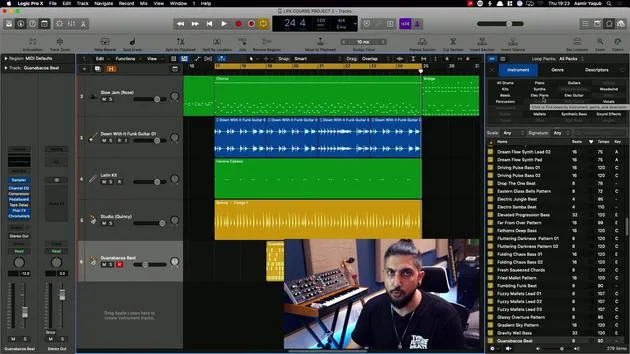
Aamir YaqubAamir Yaqub muestra cómo añadir el botón Capture Recording de Logic a tu barra de control para que nunca pierdas una toma, aunque te olvides de pulsar grabar mientras improvisas.
Qué incluye el curso
12 lecciones (1h 20m) · 1 gratis
01. Introducción a la creación de beats
Lección gratis0:33
02. Qué es MIDI
1:07
03. Conectar un controlador USB
1:46
04. Grabar con un controlador USB-MIDI
9:08
05. Función oculta: Capture Recording
Estás aquí3:09
06. Cuantización
6:38
07. Herramientas de edición en el Piano Roll
13:24
08. Crear beats con Drummer
6:42
09. Sacar el máximo partido a Drummer
13:55
10. Parámetros avanzados en Drummer
4:32
11. Crear beats con Apple Loops
10:16
12. Explorar loops y usar los metadatos de los loops
9:17
Transcripción de la lección
Capture Recording in Logic
So there's a great feature that we have in Logic, which is a little bit of a hidden feature. It kind of goes back to something that we discussed earlier, where we looked at the transport.
Adding the Capture Recording Button
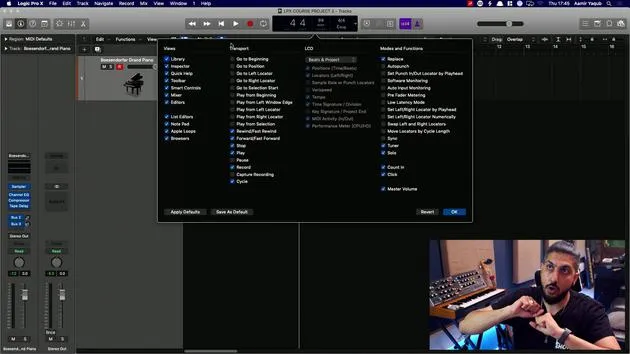
- Up here, next to the LCD display, there's a button that we can add to make our life a little bit easier, and it's called the Capture Recording button.
- Right-click up here next to the transport.
- Go to Customize Control Bar and Display.
This will bring up all of the buttons that you can add to your control bar and your display.
- The button that we want to add is Capture Recording.
- When I do that, I see a record button with a white circle around it.
Customizing Your Control Bar
For modes and functions, you can add other buttons related to recording, and you can remove buttons that you don't want to see. This is a cool way to customize your control bar!
What Does Capture Recording Do?
Let's say you are working with a song and you're just jamming along. Maybe you're even in cycle mode. What happens if you forget to press record?
This happens quite often, but the Capture Recording button can really help in situations like this.
- As long as the playhead is moving, that big thing that moves along your session, it's capturing all of your movements into your MIDI controller.
Example Scenario
- Let's set it on play, right?
- I'll put the click on by pressing K (the click, or the metronome).
Now, I have a bit of timing and I pretend I'm jamming along to a song. Suddenly, I go, "Oh no, I forgot to press record! How could I be so silly?"
Good news! Capture Recording will bring that all up for me.
Retaining the Capture Recording Button
Of course, it's up to you whether you want to keep that or not.
- Capture Recording is super handy to have.
- If you create a template, that Capture Recording button will stay in your transport for the entirety of your use of that template to start out.
It's a super handy thing to have!
12 lecciones
1h 20m de lecciones en vídeo estructuradas
Funciones de vídeo avanzadas
Ralentiza, repite un pasaje, sigue la partitura
Móvil, tablet y ordenador
Practica donde quieras
Garantía de satisfacción 100%
30 días de garantía de devolución
Conoce a tu gurú
Conoce a tu gurú
Aamir Yaqub es un productor e ingeniero musical afincado en Londres. Ha trabajado con algunos de los nombres más grandes de la música, entre ellos Alicia Keys, David Guetta, Rihanna, Sia y will.i.am, además de desarrollar a artistas independientes.
A lo largo de sus cursos enseña su flujo de trabajo completo en Logic Pro: desde la interfaz y la grabación, pasando por la creación de ritmos, la síntesis y los efectos MIDI, hasta la mezcla y el acabado de un tema.







